
Scheduling maintenance, ordering parts, and invoicing are an essential part of everyday life at an auto repair shop. However, if these daily tasks are taking up more time than they should, the reason may lie in your repair shop software. Here are five signs that your current system may no longer meet your needs—and why you should choose a software solution designed specifically for auto repair shops.
A routine maintenance service can turn into a major repair job if a mechanic discovers a new problem with the car. In this case, the cost estimate must be updated, the customer’s approval for the additional work must be obtained, the availability of parts must be checked, and the schedule must be adjusted.
As the workload increases, updating appointments, checking the availability of replacement parts, and keeping work orders up to date can take more and more time. Therefore, the repair shop software must also be able to handle the growing workload.
Here are five signs to look out for
1. Scheduling maintenance is a constant puzzle
Repairs on one car are taking longer than expected, another needs urgent repairs, and all service bays are booked. Which maintenance tasks can be postponed, and which of the mechanics would have time to take on new jobs?
If it’s difficult to check available capacity or adjust maintenance reservations in the current system, even minor schedule changes can create a lot of extra work. The resource calendar should show mechanic availability, maintenance locations, and scheduled jobs all in a single view. This way, you can quickly see which jobs can be rescheduled and where there is available capacity.
2. Handling and procuring spare parts is a laborious process
Once the problem has been identified, you need to find the correct replacement part, check its price and availability, and add it to the work order. If this requires copying part numbers and re-entering the same information, ordering replacement parts becomes unnecessarily complicated.
With the repair shop software integrated into suppliers’ product catalogs, you can go directly from the work order to the product catalog to select the appropriate replacement parts and add the selected items back to the work order. This reduces manual work and minimizes the risk of errors.
Are you looking for new repair shop software?
Software that was well-suited for a small auto repair shop may no longer meet your needs as the number of mechanics, customers, and repair jobs increases. Confirma Quick3 is browser-based repair shop software that grows with your business.
3. It takes too long to bill for completed repair work
The repair work is complete, but before invoicing, we still need to verify the mechanics’ work hours, the replacement parts used, and any additional work. If the mechanics are unable to easily record this information as the work progresses, preparing the invoice will take longer, and some of the work that should be billed may be overlooked.
When work hours and spare parts used are recorded directly on the work order, the information remains up to date throughout the repair process. If necessary, the work documentation can be supplemented with photographs. Once the work order has been approved, it can be used as the basis for invoicing, even in situations where costs are split between the customer and the insurance company.
4. Checking the vehicle's maintenance status takes too much time
A customer calls and asks if their car will be ready this afternoon. You can see the service appointment in the system, but figuring out which work has already been completed and which is still in progress takes too much time. The same situation can arise when a returning customer inquires about a previous repair and you need to check what work was done on the car.
Employees should be able to easily check a vehicle’s current work order, previous repairs, and replacement parts used without having to search through individual entries.
5. It is difficult to track the profit margins on labor hours and spare parts
How many working hours were logged last month? Are certain repair jobs taking longer than estimated? What kind of profit margins are generated from spare parts sales? Your current system may contain all this information, but how easily can you access it and put it to use?
If reporting requires constantly exporting data from the system, manual calculations, or reviewing individual work orders, important trends may go unnoticed. Reporting should help you identify where labor hours are increasing or spare parts margins are shrinking, without having to calculate the figures yourself.
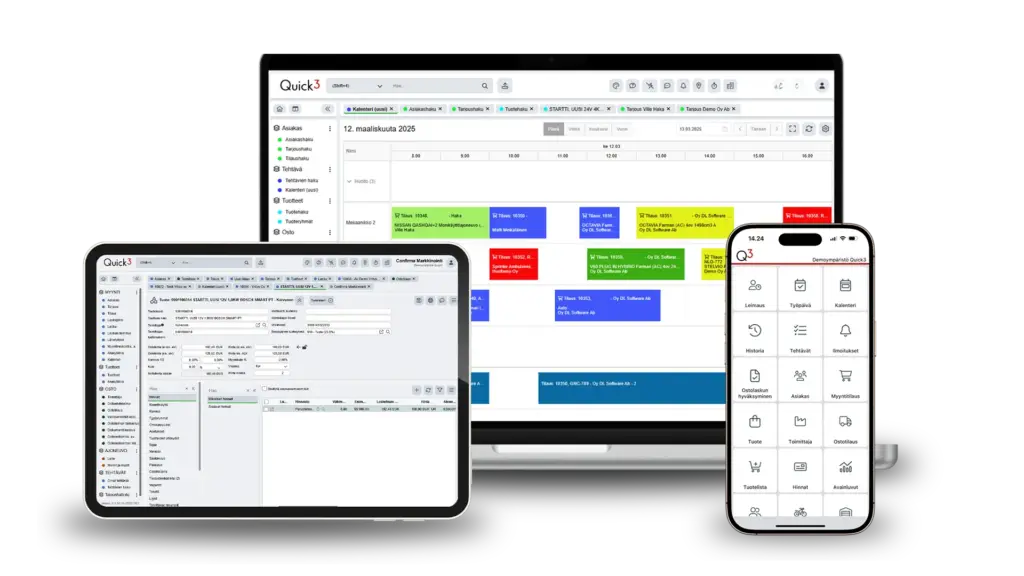
Does your current repair shop software keep up with your day-to-day needs?
If changing maintenance schedules, ordering replacement parts, or preparing invoices consistently takes more time and effort than it should, you should consider whether your current repair shop software still meets your needs.
Confirma Quick3 is a browser-based enterprise resource planning (ERP) system that includes features designed specifically for auto repair shops. It integrates appointment scheduling, work orders, spare parts, and invoicing, allowing the same data to be used throughout the entire repair process without having to re-enter it repeatedly. The system can also be expanded with new features as the repair shop’s needs change.
